Linux runs most of the internet-facing servers, containers and cloud workloads that attackers target, and Linux incidents look different from Windows ones. There is no registry and no prefetch, logging depends heavily on how the box was configured, and many intrusions end in a crypto miner, a web shell or a quiet SSH key rather than ransomware. This guide covers triage of a suspect Linux host from first contact to containment: what to collect, in what order, with which commands and tools, and what the evidence means.
Ground rules for Linux triage
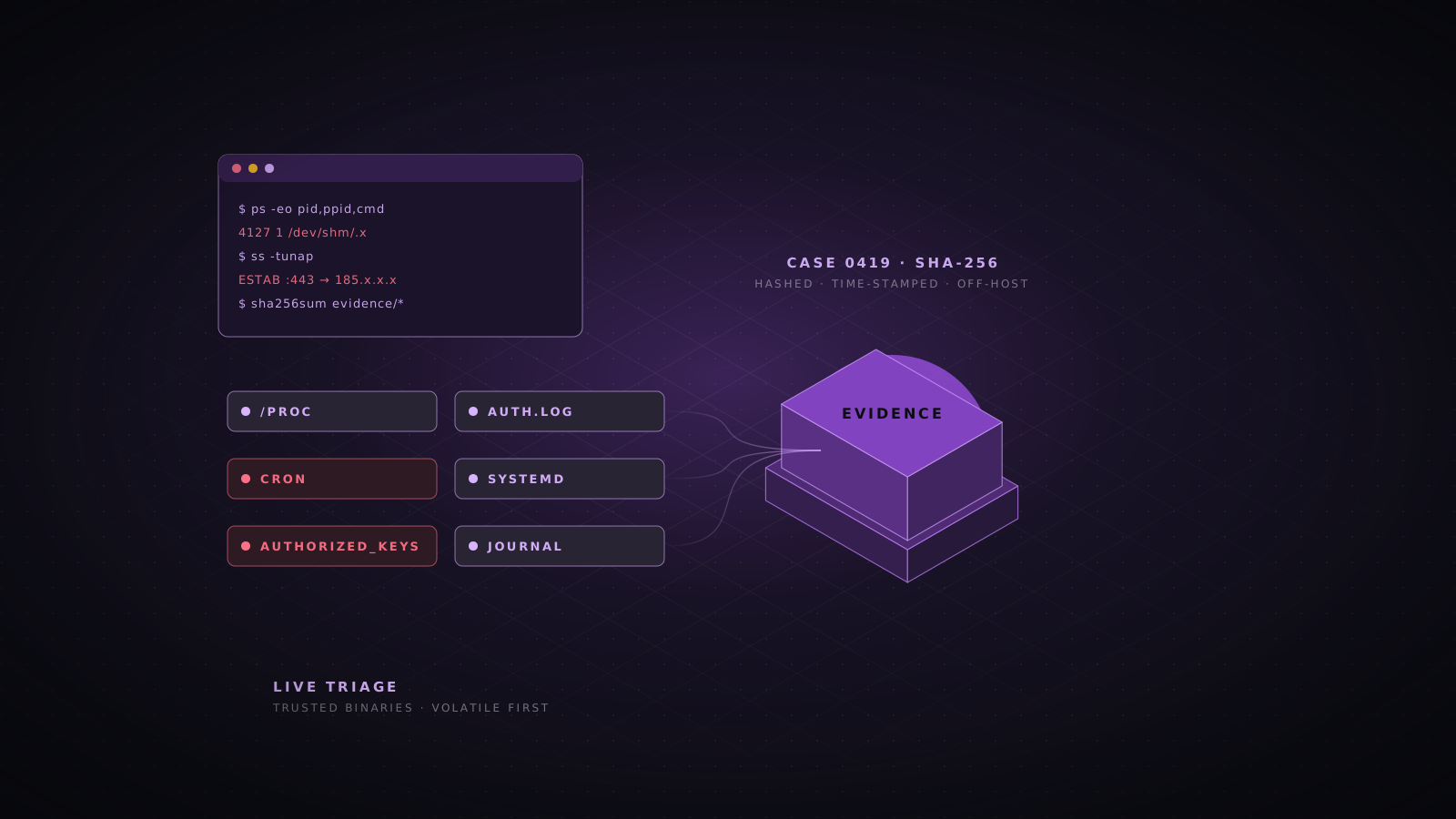
- Do not trust the binaries on the host. Userland rootkits replace ps, ls, netstat and ss, and LD_PRELOAD rootkits hook the library calls those tools make. Bring statically linked tools on read-only media, and cross-check what tools report against /proc.
- Collect in order of volatility: memory, then network connections and processes, then logged-on users and temporary file systems such as /tmp, /dev/shm and /run, then disk and logs.
- Minimize your footprint. Every command you run changes access times, writes to shell history and may overwrite deleted data. Write output to external media or stream it over the network, never to the suspect file system.
- Do not reboot. Memory, running malware, /dev/shm contents and network state all disappear, and a reboot may trigger attacker cleanup or a destructive payload placed in a startup script.
- Work in UTC and record every command you run with its timestamp. The script utility does this for you.
- If the host is a cloud VM, snapshot the disks through the provider API before you do anything invasive. The snapshot is your evidence copy if the host is destroyed.
sudo mkdir -p /mnt/ir && sudo mount -o ro /dev/sdb1 /mnt/ir      # read-only toolkit
export PATH=/mnt/ir/bin:$PATH                                   # trusted static binaries first
export LC_ALL=C TZ=UTC
unset HISTFILE                                                  # do not overwrite user history

OUT=/mnt/evidence/$(hostname)-$(date -u +%Y%m%dT%H%M%SZ)        # separate writable evidence disk
mkdir -p "$OUT"
script -q -a "$OUT/session.log"

# No spare disk? Stream each output to your analysis host instead:
ps auxwwf | ssh analyst@10.0.0.50 "cat > /cases/host01/ps.txt"cat /etc/ld.so.preload 2>/dev/null # normally missing or empty
echo "LD_PRELOAD=$LD_PRELOAD"
grep -r LD_PRELOAD /etc/environment /etc/profile /etc/profile.d /etc/bash.bashrc 2>/dev/null
ldd /bin/ps /bin/ls /usr/bin/ss # unexpected libraries are a warning signIf /etc/ld.so.preload exists and lists a library you cannot explain, assume a userland rootkit is active and that ordinary tools are lying. Switch entirely to static binaries and direct reads of /proc, and plan for memory analysis.
The Linux triage toolkit
| Tool | Purpose | Notes |
|---|---|---|
| UAC (Unix-like Artifacts Collector) | Scripted live response and artifact collection | Free; Linux, BSD, macOS, Solaris, AIX; no installation needed |
| Velociraptor | Remote live response and fleet-wide hunting | Free; same server for Windows, Linux and macOS |
| AVML | Memory acquisition without a kernel module | Free from Microsoft; works on most modern kernels |
| LiME | Memory acquisition through a loadable kernel module | Must be compiled for the exact running kernel |
| Volatility 3 | Memory analysis | Needs a symbol table (ISF) built for the exact kernel |
| Static busybox and coreutils | Trusted replacements for ps, ls, netstat and friends | Build or download in advance and hash them |
| unhide, chkrootkit, rkhunter | Hidden process, port and rootkit checks | Expect false positives; compare against a clean baseline |
| YARA, THOR Lite, Loki | Signature scanning of files and process memory | Community rules for miners, web shells and Linux malware |
| bpftool | List loaded eBPF programs and maps | Detects eBPF-based rootkits and unexpected tracing |
| The Sleuth Kit and Plaso | Disk image analysis and timelines | fls, mactime, istat; log2timeline for super timelines |
| osquery | SQL queries over live system state | Useful for consistent questions across many hosts |
The first minutes: context
{
  date -u; hostname -f; cat /etc/os-release; uname -a
  uptime; cat /proc/uptime; timedatectl 2>/dev/null
  ip -br addr; ip route
  cat /etc/resolv.conf
  df -hT; findmnt -D
  who -a; w
} > "$OUT/context.txt" 2>&1
Note anything that already looks wrong: an uptime that matches the start of suspicious activity, unusual mounts such as a tmpfs where it should not be, an unknown DNS resolver, or an administrator session from an unfamiliar address. If the host is part of a cluster or behind a load balancer, record which peers it talks to; you will probably need to triage them too.
Memory acquisition and analysis
Fileless malware, injected code, deleted binaries still running and decrypted configuration all live in memory. AVML is the simplest acquisition tool for modern systems because it needs no kernel module; LiME is the fallback when AVML cannot read memory, but it must be built against the exact kernel version, ideally on a matching clean machine rather than on the suspect host.
# AVML: a single static binary
sudo /mnt/ir/bin/avml "$OUT/memory.lime"
sha256sum "$OUT/memory.lime" | tee -a "$OUT/hashes.txt"

# LiME: module compiled for $(uname -r) on a clean build host
sudo insmod /mnt/ir/lime/lime-$(uname -r).ko "path=$OUT/memory.lime format=lime"
sudo rmmod lime
Volatility 3 needs a symbol table for the exact kernel build. Generate it with dwarf2json from the kernel debug symbols, which distributions publish as linux-image-*-dbgsym on Ubuntu, linux-image-*-dbg on Debian and kernel-debuginfo on RHEL. Do this on your analysis machine, not on the suspect host.
dwarf2json linux --elf /usr/lib/debug/boot/vmlinux-6.8.0-45-generic > volatility3/symbols/linux/6.8.0-45-generic.json

vol -f memory.lime linux.pslist
vol -f memory.lime linux.pstree
vol -f memory.lime linux.psaux               # full command lines
vol -f memory.lime linux.bash                # bash history recovered from memory
vol -f memory.lime linux.sockstat            # sockets per process
vol -f memory.lime linux.lsof --pid 4127
vol -f memory.lime linux.malfind             # injected executable memory
vol -f memory.lime linux.lsmod
vol -f memory.lime linux.check_modules       # modules hidden from the module list
vol -f memory.lime linux.check_syscall       # hooked system call table entries
vol -f memory.lime linux.envars --pid 4127
The linux.bash plugin is often the single most useful output: it recovers command history from the memory of running bash processes, including commands from sessions where the attacker disabled or deleted the history file.
Processes
ps -eo pid,ppid,user,lstart,etime,stat,%cpu,%mem,cmd --forest > "$OUT/ps.txt"
ps auxwwf >> "$OUT/ps.txt"

# Raw view from /proc, which a userland rootkit cannot easily filter
for p in /proc/[0-9]*; do
  pid=$(basename "$p")
  printf '%s\t%s\t%s\t%s\n' "$pid" "$(awk '/^PPid/{print $2}' "$p/status" 2>/dev/null)" \
    "$(readlink "$p/exe" 2>/dev/null)" "$(tr '\0' ' ' < "$p/cmdline" 2>/dev/null)"
done > "$OUT/proc-list.tsv"P=4127
ls -l /proc/$P/exe /proc/$P/cwd # "(deleted)" means the binary was removed
tr '\0' ' ' < /proc/$P/cmdline; echo
tr '\0' '\n' < /proc/$P/environ # SSH_CLIENT, PWD, unusual variables
cat /proc/$P/status | grep -E 'Name|PPid|Uid|Gid'
ls -l /proc/$P/fd # open files, sockets, pipes
cat /proc/$P/maps | grep -v '\.so' # anonymous and odd mappings
cat /proc/$P/net/tcp /proc/$P/net/tcp6
# Recover the binary even if it was deleted from disk
cp /proc/$P/exe "$OUT/pid-$P.bin" && sha256sum "$OUT/pid-$P.bin" | tee -a "$OUT/hashes.txt"# Processes whose binary has been deleted
ls -l /proc/[0-9]*/exe 2>/dev/null | grep deleted
# Processes running from temporary or hidden locations
ls -l /proc/[0-9]*/exe 2>/dev/null | grep -E '/tmp/|/var/tmp/|/dev/shm/|/run/user/|/\.'
# User processes pretending to be kernel threads: real kernel threads have PPID 2 and no exe
ps -eo pid,ppid,args | awk '$2 != 2 && $2 != 0 && $3 ~ /^\[/'
# Hash every running executable through /proc, including deleted ones
sha256sum /proc/[0-9]*/exe 2>/dev/null | sort -u -k1,1 > "$OUT/exe-hashes.txt"
# Processes hidden from ps
unhide proc; unhide sys- Interpreters with network sockets: bash, sh, python, perl or php holding a TCP connection usually means a reverse shell. Look for /dev/tcp in command lines.
- Web server children: nginx, apache2, httpd, php-fpm or java spawning sh, bash, curl, wget or nc indicates code execution through the web application.
- Sustained high CPU from an unfamiliar process name is the classic sign of a crypto miner, often named to look like a system service (kworkerds, kthreaddi, systemd-udevd in the wrong path).
- Processes whose working directory is /tmp, /dev/shm or a hidden folder, and processes owned by service accounts such as www-data or postgres that should never run interactive tools.
Network state
{
  ss -tunap; ss -xp
  ip addr; ip route; ip neigh
  ip link | grep -i promisc              # sniffers put interfaces in promiscuous mode
  iptables-save 2>/dev/null; nft list ruleset 2>/dev/null
  cat /etc/hosts
  conntrack -L 2>/dev/null | head -500
} > "$OUT/network.txt" 2>&1

# Compare against the kernel tables directly
cat /proc/net/tcp /proc/net/tcp6 /proc/net/udp > "$OUT/proc-net.txt"
unhide-tcp                                # ports in use but hidden from ss
Pay attention to connections to unusual ports (3333, 4444, 5555, 7777 and 14444 are common mining pool and reverse shell ports), long-lived outbound connections from server processes, listeners on high ports bound to all interfaces, and firewall rules that the configuration management system did not create. A short packet capture can confirm what a suspicious connection carries; exclude your own session from it.
timeout 300 tcpdump -i any -nn -s 0 -w "$OUT/capture.pcap" 'not (host 10.0.0.50 and port 22)'Users, keys and authentication
Attackers on Linux overwhelmingly keep access through accounts and SSH keys rather than malware. A new authorized key survives every patch, every malware cleanup and every password reset, so key and account review is one of the most important parts of Linux triage.
awk -F: '$3 == 0 {print "UID 0:", $1}' /etc/passwd             # only root expected
awk -F: '$3 >= 1000 || $7 !~ /(nologin|false)$/ {print $1, $3, $6, $7}' /etc/passwd
awk -F: '$2 !~ /^[!*]/ {print "has password:", $1}' /etc/shadow
grep -E '^(sudo|wheel|adm|docker|lxd|disk):' /etc/group
cat /etc/sudoers /etc/sudoers.d/* 2>/dev/null | grep -Ev '^\s*(#|$)'
ls -la --time-style=full-iso /etc/passwd /etc/shadow /etc/group /etc/sudoers /etc/sudoers.d/
Membership of docker, lxd or disk is effectively root, and attackers add themselves there because few people check it. A NOPASSWD rule for ALL commands, or for an editor, interpreter or find, is also a root equivalent. Compare modification times on the identity files with the incident window.
sshd -T 2>/dev/null | grep -Ei 'authorizedkeysfile|authorizedkeyscommand|permitrootlogin|passwordauthentication'

awk -F: '{print $1, $6}' /etc/passwd | while read -r user home; do
  for f in "$home/.ssh/authorized_keys" "$home/.ssh/authorized_keys2"; do
    [ -f "$f" ] || continue
    echo "===== $user $f"
    ls -la --time-style=full-iso "$f"
    cat "$f"
  done
done > "$OUT/authorized-keys.txt" 2>&1

lsattr /root/.ssh/authorized_keys /home/*/.ssh/authorized_keys 2>/dev/null   # immutable flag set?
Look for keys you cannot match to a person or system, keys with comments that do not fit your naming scheme (or no comment at all), forced command or from options you did not set, keys on service accounts such as www-data or postgres, and authorized_keys files made immutable with chattr so that cleanup fails. Also confirm sshd reads only the key files you expect; an attacker can add an extra AuthorizedKeysFile path in sshd_config.
last -Faiwx > "$OUT/last.txt"                   # wtmp: logins, reboots, shutdowns
lastb -Faiw > "$OUT/lastb.txt" 2>/dev/null       # btmp: failed logins
lastlog 2>/dev/null > "$OUT/lastlog.txt"
# Newer distributions record logins in wtmpdb and lastlog2 instead
wtmpdb last 2>/dev/null >> "$OUT/last.txt"; lastlog2 2>/dev/null >> "$OUT/lastlog.txt"

# Debian and Ubuntu: /var/log/auth.log    RHEL: /var/log/secure
zgrep -h 'Accepted' /var/log/auth.log* /var/log/secure* 2>/dev/null | sort > "$OUT/ssh-accepted.txt"
zgrep -h 'Failed password' /var/log/auth.log* /var/log/secure* 2>/dev/null |
  grep -oE 'from [0-9a-f.:]+' | sort | uniq -c | sort -rn | head -30
journalctl _COMM=sshd --since "2026-10-20" -o short-iso-precise --utc | grep -E 'Accepted|session opened'
journalctl _COMM=sudo --since "2026-10-20" -o short-iso-precise --utc
With LogLevel VERBOSE, every accepted key login is logged with the key fingerprint, which you can match to entries in authorized_keys with ssh-keygen -lf. A successful login from an address that also appears in the failed-password list is the signature of a brute force that worked. Check wtmp for tampering with utmpdump: zeroed records, gaps in reboot entries, or a file much smaller than the log rotation schedule suggests.
Logs and history
| Source | Debian and Ubuntu | RHEL family | Shows |
|---|---|---|---|
| Authentication | /var/log/auth.log | /var/log/secure | SSH, sudo, su, PAM, user changes |
| System | /var/log/syslog | /var/log/messages | Services, cron, kernel, most daemons |
| systemd journal | /var/log/journal/ (if persistent) | /var/log/journal/ (if persistent) | Everything above, structured, with process metadata |
| Audit | /var/log/audit/audit.log | /var/log/audit/audit.log | Syscalls, executions, file watches, logins if configured |
| Package changes | /var/log/dpkg.log, /var/log/apt/history.log | /var/log/dnf.log, dnf history | Software installed or removed by the attacker |
| Cron | syslog, journal | /var/log/cron | Scheduled job runs |
| Web servers | /var/log/nginx/, /var/log/apache2/ | /var/log/nginx/, /var/log/httpd/ | Exploitation attempts, web shell use |
| Logins | /var/log/wtmp, btmp, lastlog | /var/log/wtmp, btmp, lastlog | Login sessions, failures, last login per user |
| Shell history | ~/.bash_history, ~/.zsh_history | ~/.bash_history, ~/.zsh_history | Commands typed, if not disabled |
| Containers | /var/lib/docker/containers/*/*-json.log | /var/lib/docker/containers/*/*-json.log | Container stdout and stderr |
| Cloud agents | /var/log/cloud-init.log, provider agents | /var/log/cloud-init.log, provider agents | User data scripts and metadata changes |
journalctl --list-boots
journalctl --since "2026-10-20 00:00" --until "2026-10-28 00:00" -o short-iso-precise --utc > "$OUT/journal.txt"
journalctl -k --since "2026-10-20" --utc | grep -Ei 'module|taint|segfault|denied'
journalctl --verify 2>&1 | tail                     # detects corrupted or altered journal files

ausearch -i -m USER_LOGIN,USER_AUTH,USER_CMD --start 10/20/2026 00:00:00 > "$OUT/audit-auth.txt"
ausearch -i -m EXECVE --start recent | head -200
aureport -x --summary                               # most executed programs
aureport --login --failed --summary
# ausearch dates follow the system locale; use "recent", "today" or "this-week" to avoid surprisesfor h in /root /home/*; do
for f in "$h"/.*history; do
[ -f "$f" ] || continue
echo "===== $f"
ls -la --time-style=full-iso "$f"
cat "$f"
done
done > "$OUT/histories.txt" 2>&1
ls -la /root/.bash_history /home/*/.bash_history 2>/dev/null | grep -E ' -> |^l| 0 ' # symlinked to /dev/null or emptyBash writes history only when a shell exits cleanly, has no timestamps unless HISTTIMEFORMAT was set, and is trivially disabled. Treat it as a bonus rather than a record. Signs of deliberate tampering include a history file linked to /dev/null, HISTFILE or HISTSIZE changed in a profile script, history that stops abruptly, and commands such as history -c, unset HISTFILE or shred in what remains.
L=/var/log/nginx/access.log*
zcat -f $L | awk '{print $1}' | sort | uniq -c | sort -rn | head -20
zcat -f $L | grep -E '"POST [^"]+\.(php|jsp|aspx?|cgi)' | awk '{print $7}' | sort | uniq -c | sort -rn | head -30
zcat -f $L | grep -Ei 'union.+select|\.\./\.\.|/etc/passwd|cmd=|exec=|base64_decode|wget%20|curl%20|\$\{jndi:' | head -50
zcat -f $L | awk '$9 == 200 && $7 ~ /\.(php|jsp)/' | grep -Ev 'index\.php|wp-cron' | awk '{print $7}' | sort | uniq -c | sort -n | head
A web shell typically appears as a rarely requested script, often in an upload or cache directory, receiving POST requests from a small set of addresses and returning 200. Once you find one request, pivot on the client address and the user agent to find everything else that client did, then on the file name to find when it was created.
Hunting persistence
Linux persistence mechanisms are plain files in well-known places, which makes them easy to hunt once you know the list. The table summarizes the common locations; the commands below collect them. Modification times inside the incident window, and anything that downloads, decodes or launches from a temporary directory, deserve attention first.
| Mechanism | Where to look | Red flags |
|---|---|---|
| Cron and at | /etc/crontab, /etc/cron.*, /var/spool/cron/, /etc/anacrontab, atq | curl or wget piped to sh, Base64, jobs every minute, jobs owned by service accounts |
| systemd units and timers | /etc/systemd/system/, /usr/lib/systemd/system/, ~/.config/systemd/user/, generators | New units with generic names, ExecStart in /tmp or a home folder, Restart=always on unknown binaries |
| SSH | authorized_keys, sshd_config, ~/.ssh/rc, /etc/ssh/sshrc | Unknown keys, extra AuthorizedKeysFile paths, rc scripts |
| Shell start-up files | /etc/profile, /etc/profile.d/, /etc/bash.bashrc, ~/.bashrc, ~/.profile, ~/.bash_logout | Background commands, aliases replacing sudo or ssh, exported LD_PRELOAD |
| Dynamic linker | /etc/ld.so.preload, /etc/ld.so.conf.d/ | Any preload entry; libraries in unusual paths |
| PAM | /etc/pam.d/, /lib/x86_64-linux-gnu/security/, /usr/lib64/security/ | Modified pam_unix.so, unknown modules, pam_exec lines |
| Kernel modules | /etc/modules, /etc/modules-load.d/, lsmod, /sys/module | Unsigned or out-of-tree modules, tainted kernel, modules missing from lsmod |
| Init scripts and rc.local | /etc/rc.local, /etc/init.d/ | Recently added scripts on systemd hosts |
| MOTD and login hooks | /etc/update-motd.d/ | Scripts that run as root at every SSH login |
| udev rules | /etc/udev/rules.d/ | RUN+= entries launching scripts |
| Package manager hooks | /etc/apt/apt.conf.d/, /etc/yum/pluginconf.d/, /etc/dnf/plugins/ | Pre-Invoke or Post-Invoke commands |
| Web shells | Document roots, upload folders, plugin and cache directories | Recently changed scripts with eval, assert, system or Base64 payloads |
| setuid and capabilities | Anywhere on disk | New setuid binaries, cap_setuid on interpreters |
{
  ls -la --time-style=full-iso /etc/cron* /var/spool/cron /var/spool/cron/crontabs 2>/dev/null
  cat /etc/crontab /etc/cron.d/* /etc/anacrontab 2>/dev/null
  for u in $(cut -d: -f1 /etc/passwd); do crontab -l -u "$u" 2>/dev/null | sed "s/^/[$u] /"; done
  atq 2>/dev/null; ls -la /var/spool/cron/atjobs /var/spool/at 2>/dev/null
} > "$OUT/cron.txt" 2>&1

{
  systemctl list-unit-files --state=enabled --no-pager
  systemctl list-timers --all --no-pager
  find /etc/systemd /usr/lib/systemd /lib/systemd /run/systemd /home/*/.config/systemd /root/.config/systemd \
    -type f -newermt "2026-10-01" -printf '%TY-%Tm-%Td %TT %p\n' 2>/dev/null | sort
  ls -la /etc/systemd/system-generators /usr/lib/systemd/system-generators 2>/dev/null
} > "$OUT/systemd.txt" 2>&1

systemctl cat suspicious.servicels -la --time-style=full-iso /etc/profile /etc/profile.d/ /etc/bash.bashrc /etc/environment \
/root/.bashrc /root/.profile /home/*/.bashrc /home/*/.profile /home/*/.bash_logout 2>/dev/null
grep -HnE 'curl|wget|nc |ncat|/dev/tcp|base64|python.*-c|nohup|setsid|LD_PRELOAD|alias (sudo|ssh)' \
/etc/profile /etc/profile.d/* /etc/bash.bashrc /root/.bashrc /home/*/.bashrc /home/*/.profile 2>/dev/null
cat /etc/ld.so.preload 2>/dev/null; ls -la /etc/ld.so.conf.d/
grep -rn 'pam_exec\|pam_script' /etc/pam.d/ 2>/dev/null
ls -la --time-style=full-iso /lib/x86_64-linux-gnu/security/ /usr/lib64/security/ 2>/dev/null | sort -k6,7
ls -la --time-style=full-iso /etc/update-motd.d/ /etc/rc.local /etc/init.d/ 2>/dev/null
grep -rn 'RUN+=' /etc/udev/rules.d/ 2>/dev/null
grep -rn 'Invoke' /etc/apt/apt.conf.d/ 2>/dev/nullPackage verification is the quickest way to catch modified system files such as a backdoored pam_unix.so, sshd or ps. It compares installed files against the checksums the package manager recorded at install time. An attacker with root can also tamper with the package database, so treat a clean result as supportive rather than conclusive and verify critical binaries against a known-good system.
dpkg --verify 2>/dev/null | grep -v ' c /etc/' > "$OUT/dpkg-verify.txt"   # Debian and Ubuntu
debsums -c 2>/dev/null >> "$OUT/dpkg-verify.txt"
rpm -Va 2>/dev/null | grep -E '^..5' > "$OUT/rpm-verify.txt"                # RHEL: changed digest

# Who owns a suspicious file? Nothing means it did not come from a package
dpkg -S /usr/lib/x86_64-linux-gnu/security/pam_unix.so
rpm -qf /usr/lib64/security/pam_unix.solsmod > "$OUT/lsmod.txt"
cat /proc/sys/kernel/tainted # 0 is clean; non-zero needs explaining
diff <(lsmod | awk 'NR>1 {print $1}' | sort) <(ls /sys/module | sort) | grep '^>' # names in /sys only
for m in $(lsmod | awk 'NR>1 {print $1}'); do modinfo -F filename "$m"; done | grep -v '^/lib/modules'
dmesg -T | grep -Ei 'taint|module verification|loading out-of-tree'
bpftool prog list 2>/dev/null > "$OUT/bpf-progs.txt" # eBPF programs; compare with expected agents
bpftool link list 2>/dev/null >> "$OUT/bpf-progs.txt"
find / -xdev \( -perm -4000 -o -perm -2000 \) -type f -newermt "2026-10-01" -ls 2>/dev/null
getcap -r / 2>/dev/nullMany entries in /sys/module are built-in kernel components rather than loadable modules, so the diff above needs judgment, but a loaded module (one with an initstate file) that lsmod does not list was hidden on purpose. Careful rootkits remove themselves from both views, which is why memory analysis with linux.check_modules matters. eBPF programs are expected from EDR agents, Cilium, systemd and observability tools; an eBPF program you cannot attribute to software you installed is worth escalating, as eBPF rootkits can hide processes, files and network traffic.
find /var/www /srv /usr/share/nginx /opt -type f \( -name '*.php' -o -name '*.phtml' -o -name '*.jsp' -o -name '*.jspx' \) \
  -newermt "2026-10-01" -printf '%TY-%Tm-%Td %TT %u %p\n' 2>/dev/null | sort

grep -rlE 'eval\s*\(\s*(base64_decode|gzinflate|str_rot13|\$_(POST|GET|REQUEST|COOKIE))|assert\s*\(\s*\$_|system\s*\(\s*\$_|passthru|shell_exec|Runtime\.getRuntime\(\)\.exec' \
  /var/www 2>/dev/null

# PHP files in upload folders should not exist at all
find /var/www -path '*upload*' -name '*.php*' 2>/dev/null
File system triage
Linux file systems keep up to four timestamps per file: modification (mtime), access (atime, often unreliable because of relatime), inode change (ctime) and, on ext4, XFS and Btrfs, creation (birth time). Attackers routinely reset mtime with touch, but ctime cannot be set from user space without changing the system clock, so a file whose ctime is much newer than its mtime has been touched recently.
# Content modified in the window
find / -xdev -type f -newermt "2026-10-20" ! -newermt "2026-10-28" \
  -printf '%TY-%Tm-%Td %TT  %u:%g  %m  %s  %p\n' 2>/dev/null | sort > "$OUT/mtime-window.txt"

# Inode changed in the window, which catches timestomped files
find / -xdev -type f -newerct "2026-10-20" ! -newerct "2026-10-28" \
  -printf '%CY-%Cm-%Cd %CT  %p\n' 2>/dev/null | sort > "$OUT/ctime-window.txt"

# All four timestamps for one file, including birth time on current coreutils
stat --format='%n birth=%w modify=%y change=%z access=%x' /usr/local/bin/kswapd1ls -laR --time-style=full-iso /tmp /var/tmp /dev/shm /run/user 2>/dev/null > "$OUT/tmp-listing.txt"
# ELF binaries where software should not live
find /tmp /var/tmp /dev/shm /run /var/www /home -type f -size -20M -exec file {} + 2>/dev/null | grep -i 'ELF'
# Hidden names designed to be overlooked: "...", ". ", names starting with a dot in system folders
find / -xdev \( -name '...' -o -name '.. ' -o -name '. ' -o -name ' ' \) 2>/dev/null
find /usr /etc /var/lib /lib -xdev -name '.*' -type f 2>/dev/null | grep -v -E '\.(placeholder|keep|gitignore|build-id)'
# Immutable or append-only flags used to block cleanup
lsattr -R /etc /root /home /var/spool/cron 2>/dev/null | grep -E '^[^ ]*[ia][^ ]* 'sha256sum /tmp/.x /dev/shm/kworker /usr/local/bin/kswapd1 | tee -a "$OUT/hashes.txt"
file /tmp/.x; strings -n 8 /tmp/.x | head -100 # mining pool URLs, C2 addresses, wallet strings
yara -r -s -w /mnt/ir/rules/linux.yar /tmp /var/tmp /dev/shm /home /var/www /usr/local/bin 2>/dev/null
yara -s /mnt/ir/rules/linux.yar 4127 # scan a running process by PID
/mnt/ir/thor-lite/thor-lite-linux-64 -p /tmpCopy suspicious binaries to your evidence directory before anything else happens to them, and submit hashes rather than files to public services: uploading a sample to VirusTotal makes it available to every subscriber, including the attacker, who learns you have found their tool.
Collection with UAC, Velociraptor and disk images
UAC turns everything above into one repeatable command. It runs from a directory on the toolkit drive, uses whatever tools exist on the target, collects live response output, logs, configuration, histories and a body file for timelining, and writes a single archive with a hash and an acquisition log.
cd /mnt/ir/uac
sudo ./uac -p ir_triage /mnt/evidence                                   # standard triage profile
sudo ./uac -a ./artifacts/memory_dump/avml.yaml -p ir_triage /mnt/evidence   # plus memory
sudo ./uac -p full /mnt/evidence                                        # broader, slower

# Stream the output when there is no local disk to write to
sudo ./uac -p ir_triage --sftp analyst@10.0.0.50:/cases/host01 /tmp
For fleets, Velociraptor gives the same capability remotely, with hunts that run one artifact across every Linux server at once. Useful artifacts include Linux.Sys.Pslist, Linux.Ssh.AuthorizedKeys, Linux.Sys.Crontab, Linux.Sys.Users and Linux.Search.FileFinder for indicator sweeps, alongside YARA scanning artifacts for files and process memory.
sudo tar -czf - --ignore-failed-read \
  /etc /var/log /var/spool/cron /root/.ssh /root/.bash_history \
  /home/*/.ssh /home/*/.bash_history /tmp /var/tmp /dev/shm 2>/dev/null |
  ssh analyst@10.0.0.50 "tee /cases/host01/host01-triage.tgz | sha256sum > /cases/host01/host01-triage.tgz.sha256"
Take a full disk image when you need deleted file recovery, slack space or court-grade evidence. On physical machines, image the disk with dc3dd or ewfacquire to external storage. On cloud VMs, snapshot the volume through the provider, create a new volume from the snapshot, and attach it to a dedicated forensic instance in an isolated network. Mount it read-only and with noload on ext4, which stops the kernel replaying the journal and changing the evidence.
# Physical or local virtual disk
sudo dc3dd if=/dev/sda hof=/mnt/evidence/host01-sda.dd hash=sha256 log=/mnt/evidence/host01-sda.log

# AWS
aws ec2 create-snapshot --volume-id vol-0abc123 --description "IR-2026-031 host01 root" \
  --tag-specifications 'ResourceType=snapshot,Tags=[{Key=case,Value=IR-2026-031}]'

# On the forensic instance, with the copied volume attached as /dev/nvme1n1
sudo mount -o ro,noload,noexec,nodev /dev/nvme1n1p1 /mnt/case
sudo fls -r -m / /dev/nvme1n1p1 > host01.body
sudo mactime -b host01.body -d -z UTC 2026-10-20..2026-10-28 > host01-timeline.csv
Containers and Kubernetes
In container environments the compromised workload may be gone within minutes as orchestrators replace unhealthy pods. Capture first, then contain: pause the container rather than killing it, export its file system, and record its configuration, because the evidence disappears with the container.
docker ps -a --no-trunc
docker inspect web-1 > "$OUT/web-1-inspect.json"     # privileged? host mounts? capabilities?
docker top web-1
docker diff web-1 > "$OUT/web-1-diff.txt"             # files added (A), changed (C), deleted (D)
docker logs --timestamps web-1 > "$OUT/web-1.log" 2>&1
docker pause web-1                                     # freeze processes, keep memory and state
docker export web-1 -o "$OUT/web-1-fs.tar"

# Kubernetes
kubectl get pods -A -o wide
kubectl get events -A --sort-by=.lastTimestamp | tail -50
kubectl describe pod web-7d9f -n prod
kubectl logs web-7d9f -n prod --all-containers --timestamps --previous
kubectl get clusterrolebindings -o wide | grep -v system:   # unexpected cluster-admin grants
docker diff is one of the fastest triage commands available: a container image should be immutable, so every added or changed file in a running container is either expected application state or attacker activity. Check docker inspect for privileged mode, host PID or network namespaces, and mounts of /, /var/run/docker.sock or /etc, any of which turn a container compromise into a host compromise. In the cloud, also review the provider audit logs (CloudTrail, Azure Activity Log, Google Cloud Audit Logs) for use of the instance role credentials from outside the instance.
Rootkit checks
Rootkits on Linux come in three forms: userland rootkits that replace binaries or preload libraries, loadable kernel module rootkits such as Diamorphine and Reptile, and newer eBPF-based rootkits. Each hides processes, files and connections from ordinary tools, so detection relies on comparing two views of the same thing and noticing where they disagree.
- Processes: ps output against a raw walk of /proc against Volatility linux.pslist and linux.psscan style views of memory.
- Ports: ss output against /proc/net/tcp against unhide-tcp, which probes each port by trying to bind it.
- Modules: lsmod against /sys/module against linux.check_modules in memory, plus the kernel taint flag.
- System calls: linux.check_syscall and linux.check_idt in memory reveal hooked kernel entry points.
- Files: a directory listing on the live host against the same directory on a mounted disk snapshot, which the running kernel does not control.
/mnt/ir/bin/chkrootkit -q
rkhunter --check --sk --rwo --nocolors
unhide proc; unhide sys; unhide brute
unhide-tcp
Common Linux intrusion patterns
Crypto miner on an exposed service
The most common Linux compromise. Entry is usually a weak SSH password, an exposed Redis, Docker API or Kubernetes dashboard, or an unpatched web application. Expect a binary such as XMRig renamed to look like a kernel thread in /tmp, /dev/shm or /var/tmp, a cron job or systemd unit that re-downloads it every few minutes, a new authorized key, competing miners killed by a script, and connections to pool ports. Collect the dropper script; it documents everything the attacker changed. Remove all persistence before killing the process, or it will simply return.
Web shell through a vulnerable application
Look for a script in the document root or upload directory, POST requests to it in the access log, and child processes of the web server user. From there the attacker usually reads configuration files for database and cloud credentials, so assume every secret readable by the web server user is compromised and rotate it. Check whether they escalated to root through a local kernel or sudo vulnerability by looking for root-owned files created shortly after the web shell appeared.
Stolen SSH credentials or keys
An accepted login from an unfamiliar address at an unusual hour, with a known user name and a key fingerprint that matches a real employee key, points to key theft from a workstation or a CI system rather than brute force. Triage the source of the key as well as the server. Check whether the attacker used SSH agent forwarding or found private keys on this server to move further; grep shell histories and auth logs on neighboring hosts for the same source address.
Cloud credential theft
On cloud VMs the most valuable target is often the instance role. Look for requests to the metadata service at 169.254.169.254 in web logs (server-side request forgery), credentials files in ~/.aws, ~/.azure, ~/.config/gcloud and environment variables of application processes, then check the provider audit log for those credentials being used from addresses outside your environment.
Containment and recovery
- Isolate at the network level first: replace the security group or provider firewall rules with an allow rule for your analysis host only. This works even when the attacker has root on the VM and could change a host firewall.
- Freeze rather than kill. kill -STOP on a malicious process stops it while keeping its memory for collection; pausing a container does the same. Kill only after memory and binaries are collected.
- Snapshot the disks before eradication, so evidence survives the rebuild.
- Rotate everything the host could reach: SSH host and user keys, API tokens, database passwords, cloud access keys and instance role sessions, TLS private keys and secrets in environment variables or configuration files.
- Rebuild from a known-good image or configuration management rather than cleaning in place. Root-level compromise of a Linux host cannot be reliably cleaned.
- Fix the entry point before the rebuilt host goes live: patch the application, close the exposed service, enforce key-only SSH and MFA on the cloud console.
- Sweep the estate for the indicators you found (hashes, file names, keys, addresses, cron entries) and monitor closely for at least 30 days.
Quick reference checklist
- Snapshot cloud disks; mount a trusted read-only toolkit; start a recorded shell in UTC with history disabled.
- Check /etc/ld.so.preload and LD_PRELOAD before trusting any dynamic binary.
- Record host identity, uptime, mounts, interfaces, routes and logged-on users.
- Capture memory with AVML or LiME and hash it.
- Record processes from ps and from /proc; recover deleted binaries from /proc/PID/exe.
- Record sockets, firewall rules and ARP; compare ss against /proc/net and unhide-tcp.
- Review accounts, sudoers, privileged groups and every authorized_keys file.
- Pull authentication logs, wtmp, btmp, journal, audit log and shell histories.
- Hunt persistence: cron, systemd, shell profiles, linker, PAM, kernel modules, eBPF, MOTD, udev, package hooks, web shells, setuid.
- Verify packages, find files changed in the window by mtime and ctime, scan with YARA.
- Run UAC or Velociraptor for a complete, hashed collection.
- For containers: inspect, diff, logs, pause and export before the orchestrator replaces them.
- Isolate at the provider level, freeze processes, rotate every reachable secret, rebuild, sweep and monitor.
- Linux
- DFIR
- Incident response
- Triage
- Forensics
- UAC
- Volatility
- Rootkits
- Containers
- Threat hunting