Contents
Introduction
A Kubernetes cluster is a distributed system with an API that can start any code, read any secret and change any network rule, depending on who is asking. Most breaches of Kubernetes are not clever. They come from an API or dashboard left open to the internet, a service account with cluster-admin, a container running as root with the host filesystem mounted, or an ingress controller that was never patched. Each of these turns one compromised pod into a compromised cluster, and often into a compromised cloud account.
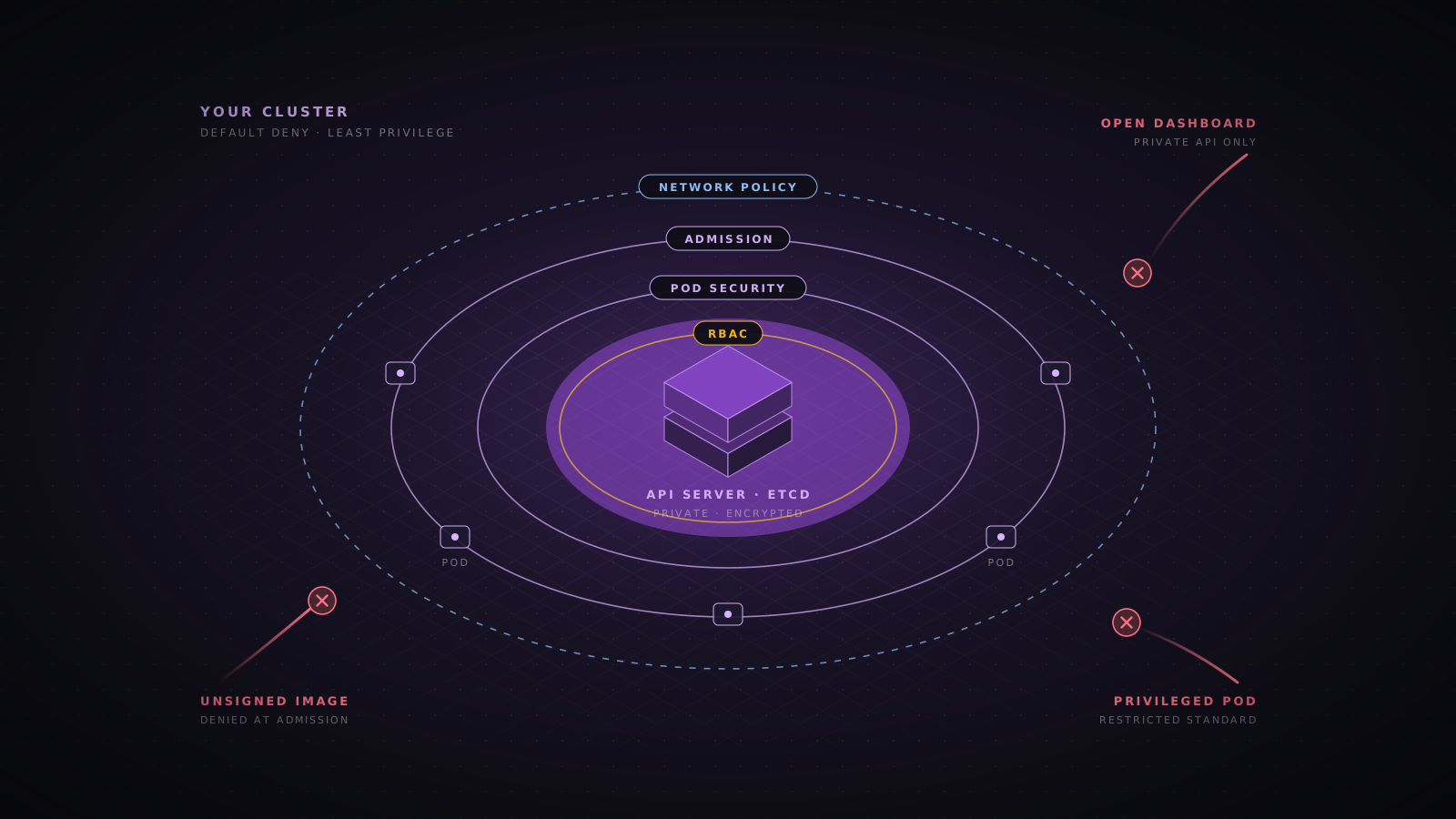
This guide hardens a cluster layer by layer: the control plane, identity and RBAC, workload settings, admission policy, the network, the supply chain, secrets, nodes and runtime detection. It applies to managed services such as EKS, GKE and AKS as well as to clusters you build yourself, and each section includes configuration you can adapt. A checklist and a mapping to the OWASP Kubernetes Top 10 close the article.
How Kubernetes clusters get breached
Real incidents follow a small number of paths. Knowing them tells you which controls to build first.
- Exposed management interfaces. In 2018 attackers found a Tesla Kubernetes console with no password, took cloud credentials from it and ran cryptominers. Open dashboards, API servers that allow anonymous requests and kubelets that accept unauthenticated calls are still found by internet scans every week.
- Vulnerable cluster components. In 2018, CVE-2018-1002105 in the API server let some users turn an ordinary request into full access to kubelets and aggregated API servers. In 2025, CVE-2025-1974, rated CVSS 9.8, let anything on the pod network take over ingress-nginx through its admission webhook and read the Secrets it could access, which by default meant every Secret in the cluster. The Kubernetes project said over 40% of clusters ran ingress-nginx at the time.
- Overly broad RBAC. Attackers who get a token with rights to create pods, read secrets or bind roles can usually reach cluster-admin. Aqua Security documented a campaign in 2023 that created its own ClusterRole and binding as a backdoor after entering through a misconfigured API server.
- Container escape. Privileged pods, hostPath mounts, host networking and unpatched kernels let a compromised container reach the node, and from the node every pod and credential on it.
- Cloud credential theft. A pod that can reach the cloud metadata endpoint, or that runs with a powerful node role, hands the attacker cloud API access beyond the cluster.
- Poisoned images. Images from public registries, unpinned tags and compromised build pipelines bring malware in through the front door.
The standards worth following
| Reference | What it gives you | Use it for |
|---|---|---|
| CIS Kubernetes Benchmark | Hundreds of specific configuration checks for the control plane, nodes and policies, with managed service variants | Automated compliance scans with kube-bench and audit evidence |
| NSA and CISA Kubernetes Hardening Guide | Government guidance on pod security, network separation, authentication, logging and upgrades | A readable baseline and justification for leadership |
| OWASP Kubernetes Top 10 | The ten most common Kubernetes risks, K01 to K10, updated in 2025 | Prioritizing work and training engineers |
| Kubernetes security checklist | The project’s own list of baseline controls, linked to the documentation | Checking a new cluster before it takes production traffic |
| MITRE ATT&CK containers matrix and the Microsoft Threat Matrix for Kubernetes | Attacker techniques mapped to the Kubernetes environment | Detection engineering and threat modelling |
Lock down the API server, etcd and kubelets
The API server is the front door to everything. It should not be reachable from the internet. On managed services, use a private endpoint or restrict the public endpoint to a short list of networks such as your VPN and CI runners. Turn off anonymous authentication, use OIDC with your identity provider for people, and keep static token files and basic authentication out of the configuration.
- Private API endpoint. Access goes through a VPN, a bastion with short-lived credentials, or the cloud provider’s private access path.
- No anonymous access. Set --anonymous-auth=false on the API server where you control it, and confirm that system:anonymous and system:unauthenticated have no bindings beyond the defaults.
- etcd isolated. Only the API server can reach etcd, over mutual TLS. Anyone who can read etcd can read every Secret, so treat its backups with the same care.
- Kubelet authentication on. The kubelet API on port 10250 can run commands in any pod on the node. Disable anonymous access and the read-only port, and send authorization decisions to the API server.
- Supported versions. Kubernetes supports the three most recent minor releases, each for roughly fourteen months. Upgrade before you fall out of that window, because security fixes stop.
apiVersion: kubelet.config.k8s.io/v1beta1
kind: KubeletConfiguration
authentication:
  anonymous:
    enabled: false
  webhook:
    enabled: true
  x509:
    clientCAFile: /etc/kubernetes/pki/ca.crt
authorization:
  mode: Webhook
readOnlyPort: 0
protectKernelDefaults: true
rotateCertificates: true
serverTLSBootstrap: trueEncrypt Secrets at rest
Kubernetes Secrets are only base64 encoded by default, and they are stored in etcd as plain data unless you configure encryption. Use the KMS v2 provider so the encryption key lives in your cloud KMS or HSM, not on the control plane disk. Managed services offer this as a setting, such as envelope encryption on EKS and application-layer secrets encryption on GKE.
apiVersion: apiserver.config.k8s.io/v1
kind: EncryptionConfiguration
resources:
  - resources: ["secrets"]
    providers:
      - kms:
          apiVersion: v2
          name: cloud-kms
          endpoint: unix:///var/run/kmsplugin/socket.sock
          timeout: 3s
- identity: {}Turn on audit logging
Audit logs are the only record of who did what through the API. Enable them on day one and send them off the cluster. Log metadata for reads of secrets, full request and response bodies for changes to RBAC, and every exec, attach and token request. On managed services, enable the control plane audit log in the provider console and route it to your SIEM.
apiVersion: audit.k8s.io/v1
kind: Policy
omitStages: ["RequestReceived"]
rules:
  - level: None
    resources:
      - group: ""
        resources: ["events"]
  - level: Metadata
    resources:
      - group: ""
        resources: ["secrets", "configmaps"]
  - level: RequestResponse
    verbs: ["create", "update", "patch", "delete"]
    resources:
      - group: "rbac.authorization.k8s.io"
      - group: ""
        resources: ["pods/exec", "pods/attach", "serviceaccounts/token"]
- level: MetadataRBAC and service accounts
RBAC decides what every person and pod can do through the API. It is additive and has no deny rules, so the only way to be safe is to grant little. Bind people to roles through groups from your identity provider, scope roles to namespaces wherever possible, and keep cluster-admin for break-glass accounts that are monitored and rarely used.
Some permissions are worth far more than they look, because each one leads to cluster-admin in a few steps. Review every binding that grants them.
| Permission | Why it is dangerous |
|---|---|
| create pods, deployments or jobs | Run a pod that mounts any service account or the host filesystem in that namespace |
| get or list secrets | Read every token and credential stored in the namespace |
| escalate, bind | Grant yourself roles with more permissions than you hold |
| impersonate | Act as any user, group or service account |
| nodes/proxy | Reach the kubelet API and run commands in pods on that node |
| create serviceaccounts/token | Mint tokens for service accounts with more rights |
| update validating or mutating webhook configurations | Disable policy or rewrite every pod that is created |
| wildcards (*) in verbs or resources | Include all of the above, and any resource added later |
# Every subject bound to cluster-admin
kubectl get clusterrolebindings -o json | jq -r '
  .items[] | select(.roleRef.name == "cluster-admin")
  | .metadata.name + ": " + ([.subjects[]? | .kind + "/" + .name] | join(", "))'

# Everything one service account is allowed to do in its namespace
kubectl auth can-i --list \
--as=system:serviceaccount:payments:api -n paymentsService accounts and cloud identity
- Do not mount tokens by default. Set automountServiceAccountToken: false on service accounts and pods, and turn it on only for workloads that call the Kubernetes API.
- One service account per workload. The default service account in each namespace should have no bindings and no mounted token.
- Use bound, short-lived tokens. Projected tokens expire and are tied to the pod. Delete old long-lived token Secrets, which never expire.
- Use workload identity for the cloud. EKS Pod Identity or IRSA, GKE Workload Identity and Azure Workload Identity give a pod its own narrow cloud role. Never rely on the node role for application access.
- Block the metadata endpoint. On AWS, require IMDSv2 with a hop limit of 1 so pods cannot reach node credentials. On GKE, Workload Identity hides the node metadata server from pods.
Workload settings that stop container escapes
Most container escapes need a setting someone chose: privileged mode, a hostPath mount, host networking, extra Linux capabilities or running as root. The Pod Security Standards define three levels, privileged, baseline and restricted, and the built-in Pod Security Admission controller enforces them per namespace with a label. Enforce restricted on every application namespace, and keep the few workloads that need more, such as CNI and storage drivers, in their own namespaces.
apiVersion: v1
kind: Namespace
metadata:
  name: payments
  labels:
    pod-security.kubernetes.io/enforce: restricted
    pod-security.kubernetes.io/enforce-version: latest
    pod-security.kubernetes.io/warn: restricted
pod-security.kubernetes.io/audit: restrictedapiVersion: apps/v1
kind: Deployment
metadata:
name: api
namespace: payments
spec:
replicas: 3
selector:
matchLabels: { app: api }
template:
metadata:
labels: { app: api }
spec:
serviceAccountName: api
automountServiceAccountToken: false
securityContext:
runAsNonRoot: true
runAsUser: 10001
seccompProfile: { type: RuntimeDefault }
containers:
- name: api
image: registry.example.com/payments/api@sha256:4f1c9a0d3b2e7f6a5c8d9e0b1a2f3c4d5e6f7a8b9c0d1e2f3a4b5c6d7e8f9a0b
securityContext:
allowPrivilegeEscalation: false
readOnlyRootFilesystem: true
capabilities: { drop: ["ALL"] }
resources:
requests: { cpu: 250m, memory: 256Mi }
limits: { memory: 512Mi }
volumeMounts:
- { name: tmp, mountPath: /tmp }
volumes:
- { name: tmp, emptyDir: { sizeLimit: 64Mi } }Enforce policy at admission
Pod Security Admission covers pod settings only. A policy engine lets you enforce the rest: images only from your registry and pinned by digest, signatures verified, required labels, no LoadBalancer services in some namespaces, no wildcards in roles. ValidatingAdmissionPolicy, stable since Kubernetes 1.30, runs CEL rules inside the API server with no extra component. Kyverno and OPA Gatekeeper add mutation, image signature verification and a large library of ready-made policies.
apiVersion: admissionregistration.k8s.io/v1
kind: ValidatingAdmissionPolicy
metadata:
  name: trusted-images
spec:
  failurePolicy: Fail
  matchConstraints:
    resourceRules:
      - apiGroups: [""]
        apiVersions: ["v1"]
        operations: ["CREATE", "UPDATE"]
        resources: ["pods"]
  variables:
    - name: images
      expression: >-
        object.spec.containers.map(c, c.image) +
        (has(object.spec.initContainers) ? object.spec.initContainers.map(c, c.image) : [])
  validations:
    - expression: >-
        variables.images.all(i, i.startsWith('registry.example.com/') && i.contains('@sha256:'))
      message: "Images must come from registry.example.com and be pinned by digest"
---
apiVersion: admissionregistration.k8s.io/v1
kind: ValidatingAdmissionPolicyBinding
metadata:
  name: trusted-images
spec:
  policyName: trusted-images
  validationActions: [Deny]
  matchResources:
    namespaceSelector:
      matchExpressions:
        - key: kubernetes.io/metadata.name
          operator: NotIn
values: ["kube-system"]Segment the network
By default every pod can talk to every other pod in the cluster, in every namespace, and to the internet. One compromised pod can then scan and reach databases, admission webhooks and internal APIs. NetworkPolicy fixes this, but only if your CNI plugin enforces it, such as Calico or Cilium, or the managed network policy option of your provider. Apply a default deny in each namespace and then allow only the flows each application needs, for ingress and for egress.
apiVersion: networking.k8s.io/v1
kind: NetworkPolicy
metadata:
  name: default-deny
  namespace: payments
spec:
  podSelector: {}
  policyTypes: [Ingress, Egress]
---
apiVersion: networking.k8s.io/v1
kind: NetworkPolicy
metadata:
  name: allow-dns
  namespace: payments
spec:
  podSelector: {}
  policyTypes: [Egress]
  egress:
    - to:
        - namespaceSelector:
            matchLabels:
              kubernetes.io/metadata.name: kube-system
          podSelector:
            matchLabels:
              k8s-app: kube-dns
      ports:
        - { protocol: UDP, port: 53 }
- { protocol: TCP, port: 53 }- Control egress. Most workloads need a few external hosts, not the whole internet. Allow those explicitly, and route the rest through an egress gateway or proxy that logs connections.
- Protect internal services. Admission webhooks, metrics endpoints and databases should accept traffic only from the pods that need them. The ingress-nginx vulnerability was exploitable because its webhook was reachable from any pod.
- Encrypt pod traffic where it matters. A service mesh such as Istio or Linkerd, or Cilium with WireGuard, adds mutual TLS and workload identity between services.
- Keep the edge maintained. Ingress controllers sit on the internet and hold TLS keys. The Kubernetes project announced in November 2025 that ingress-nginx would be retired, with best-effort maintenance only until March 2026. If you still run it, plan a move to the Gateway API or another maintained controller.
Images and the supply chain
Everything that runs in the cluster arrived as an image. Control where images come from, what is inside them and who built them. Build from small base images such as distroless or a minimal OS image, scan them in CI and in the registry, sign them in the pipeline, and deploy them by digest so a tag cannot be moved under you.
IMAGE=registry.example.com/payments/api@sha256:4f1c9a0d3b2e7f6a5c8d9e0b1a2f3c4d5e6f7a8b9c0d1e2f3a4b5c6d7e8f9a0b

# Fail the build on fixable high and critical vulnerabilities
trivy image --severity HIGH,CRITICAL --ignore-unfixed --exit-code 1 "$IMAGE"

# Keyless signature tied to the CI workflow identity
cosign sign --yes "$IMAGE"- Use a private registry. Mirror the public images you need, scan them on import, and allow pulls only from your registry through admission policy.
- Verify signatures at deploy time. Kyverno and Gatekeeper with the Sigstore policy controller can reject images that were not signed by your pipeline.
- Produce an SBOM. Generate one per image so you can answer whether a newly published vulnerability affects you within minutes.
- Scan what is running. New CVEs appear after deployment. Rescan running images daily and alert on new critical findings.
Secrets management
Anyone who can read a Secret object, list secrets in a namespace or run a pod that mounts it can read its value. Encryption at rest protects etcd, not the API. Keep the set of identities with secret access small, and consider keeping the source of truth outside the cluster.
- Use an external store. The External Secrets Operator or the Secrets Store CSI Driver pulls values from Vault, AWS Secrets Manager, Azure Key Vault or Google Secret Manager, so rotation and access logs live there.
- Mount as files, not variables. Environment variables appear in crash dumps, debug pages and process listings more often than files do.
- Keep secrets out of Git. Manifests and Helm values should reference secrets, never contain them. If you must store them in Git, encrypt them with Sealed Secrets or SOPS.
- Rotate on exposure. Treat any secret readable by a compromised pod or account as leaked.
Harden the nodes
A node runs many pods and holds their credentials, so a node compromise is a namespace compromise at least. Use a minimal, container-focused OS such as Bottlerocket, Talos, Flatcar or Container-Optimized OS, replace nodes rather than patching them in place, and remove SSH access in favour of audited break-glass tooling.
- Patch by replacement. Roll node pools to new images on a schedule, and quickly for kernel and container runtime fixes.
- Separate sensitive workloads. Use dedicated node pools with taints for workloads that handle payment data, secrets or untrusted code, so an escape elsewhere does not land next to them.
- Sandbox untrusted code. A RuntimeClass with gVisor or Kata Containers puts a stronger boundary around pods that run customer code or build jobs.
- Restrict node permissions. Keep the NodeRestriction admission plugin on so a kubelet can only modify its own node and pods, and give the node cloud role only what the kubelet needs.
Detect attacks at runtime
Prevention will miss something. Runtime detection watches what containers actually do: a shell starting in a production pod, a process reading a service account token, a binary that was not in the image, an outbound connection to a mining pool. Falco, Tetragon and the runtime agents of commercial cloud security platforms all use eBPF to see these events with little overhead.
- rule: Shell spawned in production container
  desc: An interactive shell started inside a container in a production namespace
  condition: >
    spawned_process and container
    and proc.name in (bash, sh, zsh, ash)
    and proc.tty != 0
    and k8s.ns.name startswith "prod"
  output: >
    Shell in container (user=%user.name ns=%k8s.ns.name pod=%k8s.pod.name
    image=%container.image.repository cmd=%proc.cmdline)
  priority: WARNING
  tags: [container, shell, mitre_execution]
Combine runtime events with the API audit log in your SIEM. Useful detections include exec into pods in production namespaces, new ClusterRoleBindings, reads of many secrets by one identity, pods created with privileged settings in namespaces that should not have them, tokens used from IP addresses outside your networks, and changes to admission webhooks.
Responding to a compromised workload
Pods are short-lived, so evidence disappears when they restart. Write the runbook in advance and make sure the people on call have the access it needs.
- Isolate, do not delete. Apply a NetworkPolicy that blocks all traffic to and from the pod, and cordon the node so nothing new is scheduled on it.
- Capture evidence. Save the pod spec, logs, events and the image digest. Take a container checkpoint or a node memory and disk snapshot if your platform supports it.
- Revoke credentials. Delete and recreate the service account to invalidate its tokens, and rotate every secret and cloud credential the pod could read.
- Scope the access. Search the audit log for every request made with the pod’s identity, and look for new roles, bindings, webhooks, DaemonSets and CronJobs.
- Rebuild. Replace the affected nodes and redeploy from a known good image. Do not clean a compromised node in place.
- Fix the cause. Close the path that let the attacker in, then add a detection for it.
kubectl apply -f https://raw.githubusercontent.com/aquasecurity/kube-bench/main/job.yaml
kubectl wait --for=condition=complete job/kube-bench --timeout=300s
kubectl logs job/kube-benchMapping the controls to the OWASP Kubernetes Top 10
| Risk | Main controls |
|---|---|
| K01 Insecure Workload Configurations | Restricted Pod Security Standard, read-only filesystems, no root |
| K02 Overly Permissive Authorization Configurations | Namespaced roles, no wildcards, reviewed escalation verbs |
| K03 Secrets Management Failures | KMS encryption at rest, external secret stores, narrow access |
| K04 Lack of Cluster Level Policy Enforcement | ValidatingAdmissionPolicy, Kyverno or Gatekeeper, signed images |
| K05 Missing Network Segmentation Controls | Default deny NetworkPolicy, egress control, mTLS |
| K06 Overly Exposed Kubernetes Components | Private API endpoint, no public dashboards, protected webhooks and kubelets |
| K07 Misconfigured and Vulnerable Cluster Components | Kubelet authentication, supported versions, patched add-ons, CIS Benchmark scans |
| K08 Cluster to Cloud Lateral Movement | Workload identity, blocked metadata endpoint, narrow node roles |
| K09 Broken Authentication Mechanisms | OIDC for people, bound tokens, no anonymous access |
| K10 Inadequate Logging and Monitoring | API audit logs, runtime detection, SIEM rules |
A cluster hardening checklist
- API. The API server is private or limited to known networks, with anonymous access off and OIDC for people.
- Data. Secrets are encrypted at rest with KMS, and etcd is reachable only by the API server.
- Kubelets. Anonymous access and the read-only port are disabled, and authorization uses the webhook mode.
- Audit. Audit logs are on and reach the SIEM, with detections for exec, RBAC changes and secret reads.
- RBAC. No unexpected cluster-admin bindings, no wildcards, and escalation permissions reviewed.
- Identity. Service account tokens are not mounted by default, and cloud access uses workload identity.
- Workloads. Application namespaces enforce the restricted Pod Security Standard.
- Policy. Admission policy allows only signed images from your registry, pinned by digest.
- Network. Every namespace has a default deny policy, egress is controlled, and the metadata endpoint is blocked.
- Nodes. Minimal OS images, replaced on a schedule, with no routine SSH access.
- Runtime. Runtime detection is deployed and its alerts are triaged.
- Versions. The cluster and its add-ons run supported, patched versions.
Conclusion
Kubernetes gives you strong security controls, but almost none of them are on by default. The clusters that get breached usually have an open API, a broad role, a privileged pod or a component nobody patched. Close the API, grant little, enforce the restricted pod settings, deny network traffic by default, control what images can run, and watch the audit log and the runtime. Run kube-bench against the CIS Benchmark to measure where you stand, fix the findings in order of exposure, and run it again after every upgrade.
Sources
- Kubernetes documentation, Security Checklist.
- Kubernetes documentation, Pod Security Standards.
- Kubernetes documentation, Role Based Access Control Good Practices.
- Kubernetes documentation, Service Accounts.
- Kubernetes documentation, Kubelet authentication and authorization.
- Kubernetes documentation, Using a KMS provider for data encryption.
- Kubernetes documentation, Auditing.
- Kubernetes documentation, Validating Admission Policy.
- Kubernetes documentation, Network Policies.
- Kubernetes documentation, Good practices for Kubernetes Secrets.
- Kubernetes releases and support period.
- CIS Kubernetes Benchmark.
- NSA and CISA, Kubernetes Hardening Guide, version 1.2 (August 2022).
- OWASP Kubernetes Top 10 (2025).
- MITRE ATT&CK, Containers matrix.
- Microsoft, Threat Matrix for Kubernetes.
- Kubernetes blog, Ingress-nginx CVE-2025-1974: What You Need to Know (March 2025).
- Wiz Research, IngressNightmare (March 2025).
- Kubernetes blog, Ingress NGINX Retirement: What You Need to Know (November 2025).
- Aqua Security, RBAC Buster: backdooring clusters with Kubernetes RBAC (2023).
- Wired, cryptojacking of Tesla’s cloud through an open Kubernetes console (February 2018).
- Kubernetes issue 71411, CVE-2018-1002105 API server privilege escalation.
- kube-bench, Aqua Security.
- Trivy documentation.
- Sigstore cosign signing documentation.
- Kyverno documentation.
- OPA Gatekeeper documentation.
- External Secrets Operator documentation.
- Falco documentation.
- Kubernetes
- Container security
- RBAC
- Pod Security Standards
- Network policy
- Admission control
- Supply chain
- CIS Benchmark
- OWASP Kubernetes Top 10
- Hardening