Contents
Introduction
Most teams shipping AI features do not run the model. They send prompts to a provider over HTTPS, either straight to a model vendor such as OpenAI, Anthropic or Google, or through a cloud platform such as Amazon Bedrock, Azure OpenAI or Vertex AI. The provider owns the GPUs, the weights and the serving stack. You still own everything that decides what goes into a request, who is allowed to send it, and what your system does with the answer. That second half is where nearly every real incident with hosted AI has happened so far.
This guide is for the engineers who wire a hosted model into a product. It covers the trust boundary you are actually responsible for, credentials and network paths, what data should never reach the prompt, prompt injection and tool use, abuse and cost limits, logging, model changes, and what to do when a key leaks. Each section has configuration or code you can adapt.
Where the provider stops and you start
Hosted AI follows the same shared responsibility model as any managed cloud service, but the line sits higher in the stack than most teams assume. The provider secures the model, its hosting and its tenancy isolation. It cannot know whether the document you pasted into a prompt was supposed to be visible to that user, or whether a tool call the model asked for should run.
| Layer | Provider owns | You own |
|---|---|---|
| Model and weights | Training data, safety tuning, weight storage and access | Choosing the model and pinning a version |
| Serving infrastructure | Hardware, tenancy isolation, patching, availability | Fallback when the provider is down or slow |
| API access | Authentication service, key and role mechanics, TLS endpoint | Key storage, rotation, least privilege, who can call |
| Data handling | Retention, encryption at rest, use for training, region of processing | Choosing the terms you sign and what data you send |
| Prompt content | Nothing | Authorization of every document and record placed in context |
| Model output | Content filters, where offered | Validation, encoding, and every action taken on the output |
| Monitoring | Platform audit logs, where offered | Application logs, abuse detection, spend alerts |
A threat model for hosted inference
The OWASP Top 10 for LLM Applications (2025 edition) is a good checklist, but it helps to start from your own architecture. Draw the request path from the user to the provider and back, mark every place untrusted text enters, and every place the model output causes something to happen. The threats below cover most of what that diagram will show.
- Credential theft. An API key in a repository, a mobile app bundle, a browser bundle or a CI log lets anyone spend your quota and read anything your account can reach, such as stored files, fine-tuned models or batch outputs.
- Sensitive data disclosure. Personal data, secrets or another tenant’s records are placed in a prompt, then retained by the provider, written to your own logs, or repeated back to the wrong user.
- Prompt injection. Instructions hidden in user input, web pages, emails or retrieved documents change what the model does, including which tools it calls and what it sends out.
- Excessive agency. The model is given tools with more permission than the current user has, so a successful injection becomes a real write, delete, payment or email.
- Improper output handling. Model output is rendered as HTML, Markdown with remote images, SQL or shell input without encoding or validation.
- Unbounded consumption. Large prompts, long outputs or scripted traffic run up cost or exhaust rate limits, a pattern often called denial of wallet.
- Supply chain and drift. A model alias moves to a new version, an SDK or plugin is compromised, or a provider changes its data terms, and behavior shifts without a deploy on your side.
- Provider compromise or outage. A breach or a long outage at the provider. You cannot prevent it, so you plan for it with data minimization and a fallback.
Read the data terms before the docs
The most important security setting for a hosted model is not in the API. It is in the contract and the account settings, and it decides what happens to every prompt you send. Get written answers to these questions for the exact product tier you will use, because consumer apps, business plans and API access from the same vendor often have different terms.
- Training use. Are API inputs and outputs used to train or improve models by default? Most business and API tiers say no, but confirm it in the agreement, not in a blog post.
- Retention. How long are prompts and completions stored, and for what purpose? Many providers keep them for a limited period, often around 30 days, for abuse monitoring. Ask whether zero data retention or a monitoring exemption is available and what it requires.
- Human review. Under what conditions can provider staff read your prompts, for example when abuse classifiers flag a request?
- Stateful features. Files, assistants, threads, vector stores, caches and batch jobs are stored on the provider side. They usually fall outside zero retention and need their own deletion process.
- Region. Where is inference processed and where is data stored? Global endpoints may route a request to any region to find capacity, which matters under GDPR and sector rules.
- Assurance. Check for a current SOC 2 Type II report, ISO/IEC 27001, and ISO/IEC 42001 for AI management. Read the subprocessor list and the breach notification clause.
Direct vendor API or cloud platform
Many frontier models are available both from the vendor directly and through a hyperscaler. The model may be the same, but the security controls around it are not. Calling a model through your existing cloud account lets you reuse the identity, network and logging controls you already run, which is often the deciding factor for regulated workloads.
| Control | Direct vendor API | Amazon Bedrock | Azure OpenAI | Vertex AI |
|---|---|---|---|---|
| Authentication | API keys, scoped by organization, project or workspace | IAM roles and policies | Entra ID with managed identities, or API keys | IAM with service accounts |
| Private network path | Usually public internet only | Interface VPC endpoint (PrivateLink) | Private endpoint | Private Service Connect and VPC Service Controls |
| Control plane audit | Vendor admin console logs | CloudTrail | Azure Activity Log | Cloud Audit Logs |
| Request logging | Your application only | Model invocation logging to S3 or CloudWatch | Diagnostic settings to Log Analytics | Request and response logging to BigQuery |
| Data residency | Depends on vendor and plan | Regional, with optional cross-region inference | Regional, global or data zone deployments | Regional, with optional global endpoint |
The direct API often gets new models and features first. The cloud platform usually wins on private networking and identity. If you use both, put them behind the same internal gateway, described below, so policy does not depend on which path a request took.
Credentials: no long-lived keys in your apps
A model API key is a bearer token for your bill and for any data stored in the account. Treat it like a database password. Never ship it to a browser or a mobile app, where it can be pulled out in minutes. Client apps call your backend, and only the backend talks to the provider.
On a cloud platform, skip keys entirely and use workload identity. Grant the service role permission to invoke only the models it needs, in the regions it needs, and only through your private endpoint.
{
  "Version": "2012-10-17",
  "Statement": [
    {
      "Sid": "InvokePinnedModels",
      "Effect": "Allow",
      "Action": [
        "bedrock:InvokeModel",
        "bedrock:InvokeModelWithResponseStream"
      ],
      "Resource": [
        "arn:aws:bedrock:eu-west-1::foundation-model/anthropic.claude-sonnet-4-5-20250929-v1:0",
        "arn:aws:bedrock:eu-west-1::foundation-model/amazon.titan-embed-text-v2:0"
      ],
      "Condition": {
        "StringEquals": { "aws:SourceVpce": "vpce-0a1b2c3d4e5f67890" }
      }
    }
  ]
}# Give the app's managed identity data-plane access to one resource
az role assignment create \
--assignee-object-id "$APP_PRINCIPAL_ID" \
--assignee-principal-type ServicePrincipal \
--role "Cognitive Services OpenAI User" \
--scope "/subscriptions/$SUB/resourceGroups/rg-ai/providers/Microsoft.CognitiveServices/accounts/aoai-prod"
# Turn off key authentication so a leaked key is worthless
az resource update \
--ids "/subscriptions/$SUB/resourceGroups/rg-ai/providers/Microsoft.CognitiveServices/accounts/aoai-prod" \
--set properties.disableLocalAuth=trueWhen the vendor only offers API keys, limit the damage a single key can do. Create one key per service and environment, scope it to a project or workspace that holds nothing else, set a spend limit on that project, and keep the key in a secrets manager that injects it at runtime. Rotate on a schedule and on every staff departure from the team that can read it. Turn on secret scanning with push protection in your source host, and scan history once, because old commits are where keys hide.
# Scans every commit; --redact keeps found secrets out of the output
gitleaks detect --source . --redact -v

# Quick manual check for common key prefixes in the working tree
git grep -nE 'sk-(proj|ant|svcacct)-[A-Za-z0-9_-]{20,}|AIza[0-9A-Za-z_-]{35}'Network paths and egress control
Private endpoints keep model traffic off the public internet and let you deny every other path. On AWS, create an interface endpoint for the Bedrock runtime and attach an endpoint policy; on Azure, add a private endpoint and set public network access to disabled; on Google Cloud, put Vertex AI inside a VPC Service Controls perimeter so data cannot be sent to a project outside it.
aws ec2 create-vpc-endpoint \
  --vpc-id vpc-0123456789abcdef0 \
  --vpc-endpoint-type Interface \
  --service-name com.amazonaws.eu-west-1.bedrock-runtime \
  --subnet-ids subnet-0aaa1111 subnet-0bbb2222 \
  --security-group-ids sg-0ccc3333 \
  --private-dns-enabled
Direct vendor APIs are public endpoints, so control the other side: the egress from your workloads. Send outbound traffic through a proxy that allows only the provider hostnames you use. This blocks a compromised service from calling an attacker’s model endpoint with your data, and makes any new AI dependency visible because it fails until someone adds it.
acl llm_apis dstdomain api.openai.com api.anthropic.com generativelanguage.googleapis.com
acl SSL_ports port 443
acl CONNECT method CONNECT

http_access deny CONNECT !SSL_ports
http_access allow CONNECT llm_apis
http_access deny allPut a gateway between your code and the model
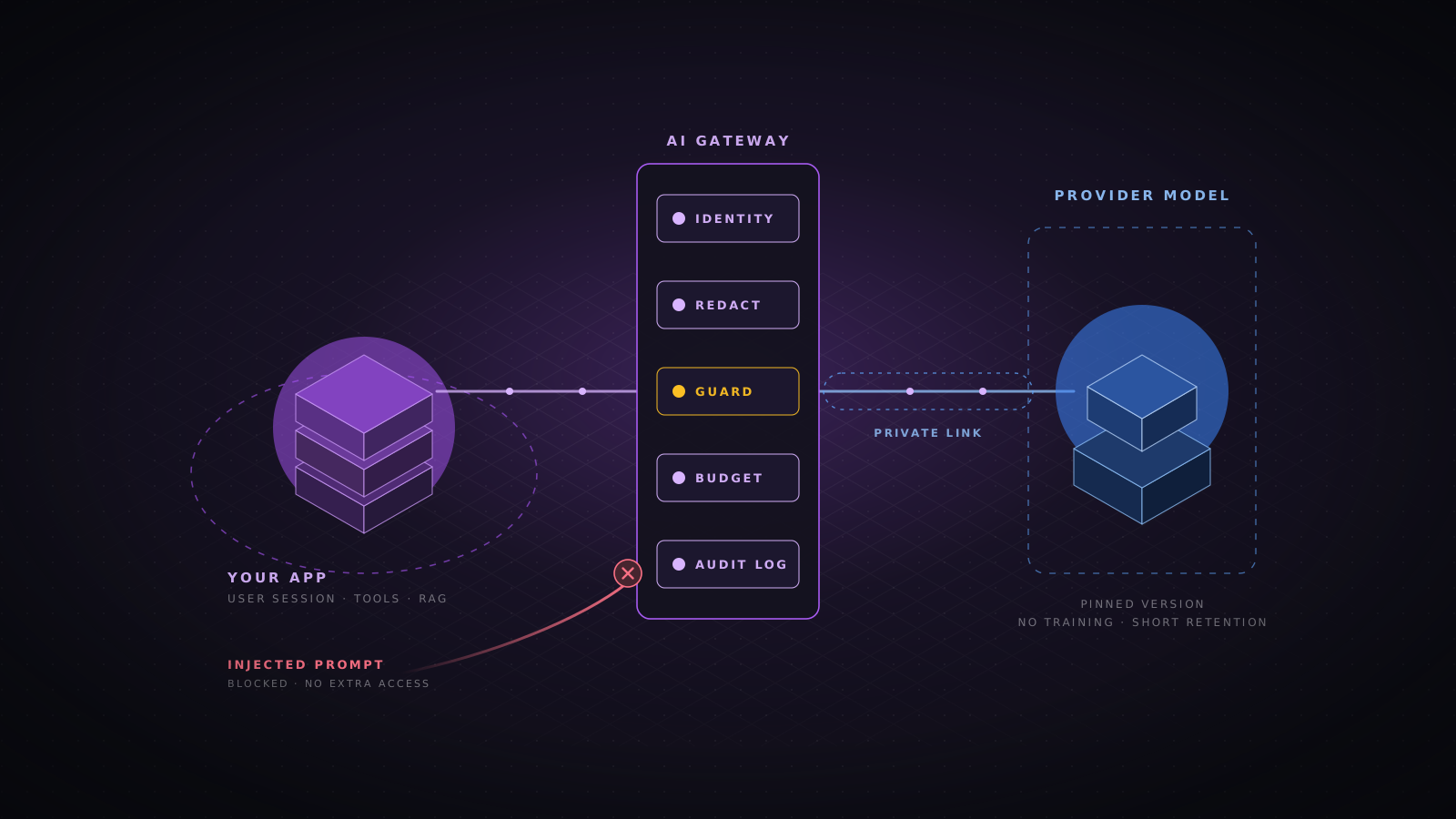
Once more than one service calls a model, move provider access into a single internal AI gateway. Services authenticate to the gateway with their normal workload identity; only the gateway holds provider credentials. You can build it on an API gateway you already run, or use a purpose-built proxy such as LiteLLM, Envoy AI Gateway or Kong’s AI plugins. The gateway is where policy lives, so it gets applied the same way to every team.
- Identity. Every request carries the calling service and the end user, so logs and limits are per user, not per shared key.
- Model allowlist. Each service can only reach the models and versions it is approved for.
- Data controls. Redaction and data classification checks run before the request leaves your network.
- Limits. Per-user and per-service token budgets, request size caps and timeouts.
- Routing. Failover to a second provider or region, and a kill switch that turns a feature off without a deploy.
- Logging. One consistent audit record per call, whatever provider served it.
Control what goes into the prompt
Anything placed in a prompt should be treated as disclosed to the provider and, unless you prove otherwise, retrievable by the user who sent the request. Data minimization is the only control that still works if the provider is breached, so apply it first and rely on contracts second.
- Classify before you send. Decide per feature which data classes may reach which provider. Secrets, credentials and payment card numbers should never be in a prompt.
- Redact or pseudonymize. Replace names, emails, phone numbers and account numbers with stable placeholders before the call, and map them back in your own service if the answer needs them.
- Keep system prompts free of secrets. Assume the system prompt will be extracted. It can describe behavior, but it must not contain keys, internal URLs you rely on staying private, or access rules you enforce nowhere else.
- Trim context. Send the few fields the task needs, not the whole customer record or the whole file.
from presidio_analyzer import AnalyzerEngine
from presidio_anonymizer import AnonymizerEngine
from presidio_anonymizer.entities import OperatorConfig

analyzer = AnalyzerEngine()
anonymizer = AnonymizerEngine()
ENTITIES = ["PERSON", "EMAIL_ADDRESS", "PHONE_NUMBER", "IBAN_CODE", "CREDIT_CARD"]

def redact(text: str) -> str:
    findings = analyzer.analyze(text=text, entities=ENTITIES, language="en")
    return anonymizer.anonymize(
        text=text,
        analyzer_results=findings,
        operators={"DEFAULT": OperatorConfig("replace", {"new_value": "<REDACTED>"})},
    ).text
Pattern and named entity detection misses things, especially in free text and in languages the model was not tuned for. Use it as a safety net on top of minimization, measure its recall on a sample of your own data, and block the request rather than silently passing it through when the detector fails.
Retrieval must respect the user’s permissions
Retrieval augmented generation is the most common way data leaks between users. The vector store holds chunks from every document, the similarity search finds the closest ones, and the model happily summarizes a document the user was never allowed to open. The model cannot enforce access control. Your retrieval query has to.
Store the tenant and access list with every chunk, take the user identity from the authenticated session, and filter inside the query before ranking. Never filter after the top results come back, because that returns fewer results and still leaks through timing and counts. Never let the model choose the filter values.
-- $1 tenant_id and $2 group ids come from the verified session, never from the prompt
SELECT id, document_id, body
FROM document_chunks
WHERE tenant_id = $1
  AND allowed_groups && $2::text[]
  AND deleted_at IS NULL
ORDER BY embedding <=> $3::vector
LIMIT 8;
Keep the index in sync with the source system. When a document is deleted or its sharing changes, the chunks and their access lists must change too, or retrieval becomes a way to read revoked data. Embeddings are derived from the source text and can be partly inverted, so give the vector store the same classification, encryption and retention rules as the documents themselves.
Prompt injection is an authorization problem
A language model reads instructions and data in the same channel, so text inside an email, a web page, a PDF or a support ticket can override what you told it to do. Direct injection comes from the user typing into your app. Indirect injection comes from content the model reads while doing its job, and it is the more dangerous one, because the attacker does not need an account.
There is no filter that reliably stops injection. Classifiers and guard models catch known patterns and raise the cost of an attack, and you should use them, but plan as if a determined attacker will get the model to do anything its tools allow. The real control is limiting what a hijacked model can reach.
Design tools for a hostile caller
- Act as the user. Tools run with the permissions of the end user making the request, never with a service account that can see every tenant.
- Validate every argument. Parse tool arguments with a strict schema and check them against the session, exactly as you would for a public API request.
- Keep identity out of the model. User IDs, tenant IDs and roles come from your server, not from tool arguments the model fills in.
- Confirm side effects. Sending, paying, deleting and sharing need an explicit confirmation from the human, shown outside the model output.
- Split read and write. Use a separate, narrower model call or agent for tasks that read untrusted content, with no tools that write or send.
import { z } from 'zod';

const RefundArgs = z.object({
  orderId: z.string().regex(/^ord_[a-z0-9]{12}$/),
  amountCents: z.number().int().positive().max(50_000),
}).strict();

export async function handleRefundTool(raw: unknown, session: Session): Promise<ToolResult> {
  const args = RefundArgs.parse(raw);
  const order = await orders.findForCustomer(args.orderId, session.customerId);
  if (!order) return { error: 'Order not found' };
  if (args.amountCents > order.refundableCents) return { error: 'Amount exceeds refundable total' };
  return { pendingConfirmation: await confirmations.create(session.userId, 'refund', args) };
}Treat model output as untrusted input
Model output is text produced under the influence of whoever wrote the input. Handle it the way you would handle a form field from an anonymous visitor. Most damaging hosted AI bugs in the wild have been ordinary web bugs with a model in the middle.
- Encode before rendering. Render output as text, or run Markdown through a sanitizer with an allowlist. Never insert it as raw HTML.
- Block image and link exfiltration. A Markdown image pointing at an attacker’s server, with secrets in the query string, sends data the moment it renders. Restrict img-src in your Content Security Policy and rewrite or drop links to unknown domains.
- Never execute it directly. Do not pass output to eval, a shell, a SQL string or a template engine. If the model writes queries, run them read-only, parameterized, with a row limit and the user’s own permissions.
- Validate structured output. When you ask for JSON, parse it against a schema and reject what does not match, even if the provider offers a structured output mode.
Content-Security-Policy: default-src 'self';
  script-src 'self' 'nonce-r4nd0m';
  img-src 'self' https://cdn.example.com;
  connect-src 'self';
  frame-ancestors 'none';
  base-uri 'none';
form-action 'self'Rate limits, budgets and denial of wallet
Every hosted model call costs money, and a public AI feature is an open tap. Attackers script free tiers to resell access, and one bad loop in an agent can spend a month of budget in an hour. Provider rate limits protect the provider, not you, so set your own limits below them.
- Cap input size. Reject requests over a fixed token or character count before they reach the gateway.
- Always set max output tokens. Choose a value per feature instead of relying on the model default.
- Budget per user. Track tokens per user per day and per minute, and return a clear error when the budget is spent.
- Bound agent loops. Limit tool calls and model turns per task, and stop on repeated identical calls.
- Alert on spend. Set provider spend limits per project and alert on hourly cost, not only on the monthly invoice.
const DAILY_TOKEN_BUDGET = 200_000;
const DAY_SECONDS = 86_400;

export async function chargeTokens(userId: string, tokens: number): Promise<boolean> {
  const key = 'llm:budget:' + userId + ':' + new Date().toISOString().slice(0, 10);
  const used = await redis.incrby(key, tokens);
  if (used === tokens) await redis.expire(key, DAY_SECONDS);
  return used <= DAILY_TOKEN_BUDGET;
}Log enough to investigate, not enough to leak
You need to answer two questions after an incident: who sent what, and what did the model do as a result. Full prompts and completions answer both, but they are also a second copy of every sensitive thing users typed. Log metadata everywhere, and keep full content only in a restricted store with short retention and its own access review.
{
  "ts": "2026-11-03T09:14:22.481Z",
  "request_id": "req_7f3c9a",
  "service": "support-assistant",
  "user_id": "u_18842",
  "tenant_id": "t_311",
  "provider": "bedrock",
  "model": "anthropic.claude-sonnet-4-5-20250929-v1:0",
  "region": "eu-west-1",
  "input_tokens": 1834,
  "output_tokens": 412,
  "latency_ms": 2210,
  "redactions": 3,
  "guard_verdict": "allow",
  "tool_calls": [{ "name": "lookup_order", "status": "ok" }],
  "prompt_sha256": "9b1e0f6c...",
  "content_ref": "s3://ai-audit-restricted/2026/11/03/req_7f3c9a.json"
}
Feed these records and the provider audit logs into your SIEM. Useful detections include a key used from an unknown network or region, a sudden jump in tokens per user, many guard model blocks from one account, tool calls that fail authorization checks, model or region values outside your allowlist, and control plane changes such as new keys, disabled logging or new private endpoints.
Pin versions and test before every model change
A model is a dependency that can change under you. Aliases such as latest move to new versions, older versions are retired on a published schedule, and safety behavior differs between versions. Pin dated model versions in configuration, track the retirement dates, and treat a model upgrade like a major library upgrade, with tests.
Keep a security evaluation suite next to your quality evaluations: known injection payloads against your real system prompt and tools, attempts to extract the system prompt, cross-tenant retrieval probes, and requests that should be refused. Run it in CI on every prompt, tool or model change. Open-source tools such as promptfoo and garak can generate and score many of these attacks.
# promptfoo: generate and run attacks against your app as configured in promptfooconfig.yaml
npx promptfoo@latest redteam run --output redteam-results.json

# garak: probe a model endpoint for prompt injection and data leakage
python -m garak --model_type openai --model_name gpt-4o-mini --probes promptinject,leakreplay
Apply normal supply chain hygiene to the AI stack as well. Pin SDK and agent framework versions, review MCP servers and plugins before you connect them, since each one is code that runs with the access you give it, and include them in your dependency scanning.
When a key leaks or the provider has a bad day
Write the runbook before you need it. A leaked model key is usually found by an invoice spike or an abuse notice from the provider, and by then it has often been shared on forums that resell stolen access. Speed matters more than root cause in the first hour.
- Revoke first. Disable the key or detach the role policy, then issue a new credential through your secrets manager. Do not wait to finish the investigation.
- Scope the exposure. Pull provider usage and audit logs for the key: source addresses, models called, token volume, and any access to stored files, fine-tuned models or batch outputs.
- Check the account. Look for new keys, members, projects, webhooks or changed retention and logging settings created with the stolen access.
- Find the source. Search repositories, CI logs, container images, client bundles and crash reports for the key, and fix the path that leaked it.
- Contain spend. Lower project spend limits and ask the provider about fraudulent usage credits, with your timeline and evidence ready.
- Assess data impact. If stored prompts, files or outputs were reachable, treat it as a possible personal data breach and involve your privacy team about notification duties.
For provider outages or provider breaches, the controls are the ones you built earlier. A gateway with a kill switch lets you turn a feature off or move to a second provider in minutes. Data minimization limits what a breach at the provider can expose. A system inventory tells you which features and which data are affected when the provider publishes its notice.
Mapping the controls to the OWASP LLM Top 10
| Risk | Main controls |
|---|---|
| LLM01 Prompt Injection | Least privilege tools, user confirmation, separate read and write agents |
| LLM02 Sensitive Information Disclosure | Data classification, redaction, retrieval authorization, provider retention terms |
| LLM03 Supply Chain | Pinned model and SDK versions, reviewed plugins and MCP servers |
| LLM04 Data and Model Poisoning | Controlled sources for retrieval and fine-tuning data |
| LLM05 Improper Output Handling | Output encoding, CSP, schema validation, no execution |
| LLM06 Excessive Agency | Tools run as the user, argument validation, loop limits |
| LLM07 System Prompt Leakage | No secrets or access rules in system prompts |
| LLM08 Vector and Embedding Weaknesses | Tenant and ACL filters inside the vector query |
| LLM09 Misinformation | Grounding with citations, evaluations, human review for decisions |
| LLM10 Unbounded Consumption | Input caps, max tokens, per-user budgets, spend alerts |
A pre-launch checklist
- Terms recorded. Provider, model version, region, training use and retention are confirmed in writing and stored in the system inventory.
- No client-side keys. Browsers and mobile apps call your backend only, and provider credentials live in the gateway or as workload identity.
- Private path. Traffic goes through a private endpoint, or through an egress proxy that allows only approved provider hosts.
- Minimal data. Prompts carry only the fields the task needs, with redaction tested on real samples.
- Retrieval authorized. Vector queries filter by tenant and access list taken from the session.
- Tools scoped. Every tool runs as the user, validates its arguments, and needs confirmation for side effects.
- Output contained. Output is encoded, links and images are restricted, and nothing is executed.
- Limits set. Input caps, max tokens, per-user budgets, loop limits and spend alerts are in place.
- Logs flowing. Gateway records and provider audit logs reach the SIEM, with full content kept separately.
- Tests in CI. The security evaluation suite runs on every prompt, tool and model change.
- Runbook ready. Key revocation, kill switch and provider failover have been exercised once.
Conclusion
Using a hosted model moves the hardest infrastructure work to the provider, but it does not move the security of your application. The provider decides how the model runs. You decide who can call it, what data it sees, what it is allowed to do, and what happens with its answer. Treat the model as a powerful, untrusted component behind a gateway you control, give it no more access than the user in front of it, and keep the logs to prove it. Those are ordinary engineering controls, and they hold up even when the model does not.
Sources
- OWASP Gen AI Security Project, Top 10 for LLM Applications 2025.
- NIST AI 600-1, Artificial Intelligence Risk Management Framework: Generative AI Profile (July 2024).
- MITRE ATLAS, Adversarial Threat Landscape for Artificial Intelligence Systems.
- Simon Willison, “The lethal trifecta for AI agents: private data, untrusted content, and external communication” (June 2025).
- AWS documentation: Amazon Bedrock security, interface VPC endpoints and model invocation logging.
- Microsoft Learn: Azure OpenAI data privacy, managed identity and disabling local authentication.
- Google Cloud documentation: Vertex AI VPC Service Controls and data governance.
- Microsoft Presidio, promptfoo and NVIDIA garak project documentation.
- AI security
- LLM
- Prompt injection
- OWASP LLM Top 10
- Amazon Bedrock
- Azure OpenAI
- Vertex AI
- RAG
- AI gateway
- Data protection